



Running a training business is more operationally demanding than it looks. Every week, the ops team schedules batches, assigns instructors, tracks attendance, collects fees, issues certificates, and compiles reports for leadership. For many, the default infrastructure is a patchwork of Zoom, spreadsheets, WhatsApp, payment links, and miscellaneous tools.
That patchwork holds, but only at the start. Somewhere between concurrent batches, a schedule falls through the gap between two sheets, a payment lands in the wrong column, or attendance for an entire cohort goes missing.
This is when a training business starts searching for a training management system. It is also when they find content catering to a different buyer entirely: HR managers running compliance training at multinational corporations, not a Head of Operations at a skilling academy.
This guide is for the second buyer. It covers what a TMS is, how it differs from an LMS, the Training OS concept that unifies both, the features worth evaluating, and how to choose the right platform for a commercial training business in 2026.
What Is a Training Management System?
A Training Management System (TMS) is software purpose-built to handle the operational and administrative side of running a training business. This includes functions like batch creation, session scheduling, instructor assignment, attendance tracking, fee management, learner communications, compliance documentation, and reporting. The key directional difference is simple. An LMS faces the learner while a TMS faces the operations team.
For a coaching institute, skilling academy, or professional certification provider, this distinction is not academic. Learners are paying customers, not employees. Instructors are often contractors, not staff. Batches repeat on a calendar with new cohorts every few weeks. They need the same operational infrastructure that enterprise L&D teams need from an LMS, but adapted for a vastly different business model where revenue directly depends on learner satisfaction.
A TMS gives your operations team six things that a scattered tool stack cannot provide: a single source of truth for batch and cohort scheduling, instructor assignment with role-based access, automated attendance tied to live sessions, integrated fee collection, centralized learner communication, and reporting that does not require a manual export. It is the system that makes training delivery possible at scale, rather than the system that delivers the training itself.
| DID YOU KNOW Training managers spend an estimated 3 to 10 hours per week on administrative coordination tasks that a TMS automates. For a training business running 10 or more concurrent batches, that is the equivalent of a part-time hire dedicated entirely to logistics. |
Training Management System vs LMS: The Real Difference
If you are confused between TMS and LMS, it is understandable. Both are training software that involve learners and courses. The difference is the problems they solve, and for whom, even inside the same organization. This table breaks both down for a clearer distinction.
| Dimension | LMS | TMS |
|---|---|---|
| Primary question answered | How is the learner progressing? | Is the training business running correctly? |
| Primary user | Learners, content creators | Operations team, training coordinators |
| Core function | Course delivery and learner tracking | Training delivery and operation management |
| What it measures | Completion rates, quiz scores, watch time | Enrollment volume, attendance compliance, revenue per batch, learner engagement health |
| Live / ILT session support | Limited or via Zoom integration workaround | Native scheduling, per-session attendance, instructor assignment |
| Multi-batch capability | Not natively modeled | Core architecture |
| Payment and invoicing | Not included or third-party only | Native, with multiple payment methods |
| Marketing and enrollment | Not included or minimal | Built-in workflows, abandoned cart, re-engagement automation |
| Business reporting | Learner completion and engagement data | Revenue, enrollment trends, instructor utilization, batch performance |
A training business that relies only on an LMS is filling the entire left side of the TMS column with manual work. The LMS does not make these tasks disappear; it just does not handle them, which means a person does.
| See how Edmingle handles batch management, attendance, and operations natively. Training businesses on Edmingle eliminate manual scheduling and attendance coordination in the first month. Book a demo to see the platform with your specific use case, or start a free trial. |
Key Features to Evaluate in a Training Management System
An enterprise L&D platform designed for aviation compliance training has different architectural priorities than a platform built for a 25-person skilling academy with certification cohorts. These seven features below are evaluated from the perspective of a commercial training business to ensure a TMS replaces your manual operations, not just add another tool to your stack.
Related Read: Best Class Scheduling Software
Multi-Batch and Cohort Management
This is the architectural test. Can the tool support 20 concurrent batches of the same certification program, each with a different group of learners, instructors, term, and a different session schedule, all tracked independently without manual reconciliation?
If the answer involves workarounds, custom labels, or the operations team managing a spreadsheet on top of the platform, the platform was not built for training operations. Purpose-built training operations platforms treat multi-batch management as a first-class architectural construct, not a configuration option.
Instructor Scheduling and Performance Tracking
Training businesses with multiple instructors need more than assigning a name to a session. They need role-based access controls so each instructor can see only their assigned batches and learners, not the entire platform. Also, per-session attendance data, trainer-level analytics, learner feedback scores, and segmented completion rates are required to make evidence-based decisions about program design and instructor development.
Attendance and Compliance Automation
Automated attendance tracking, linked directly to live session participation data, converts a large, regularly occurring manual task to a real-time data feed. Audit-ready attendance records exist as a byproduct, which helps trigger certificate issuance automatically when a learner meets the completion threshold defined for that batch. More tasks like expiry reminders for time-limited certifications get automated in a chain reaction.
Integrated Payments and Fee Management
Revenue operations is an essential feature for a TMS to support a commercial training business. Enrollment, fee collection, invoice generation, and payment reconciliation should happen inside the same platform, with the same data model. For training businesses, this also means multi-currency and payment gateway support for your learners from different backgrounds.
Marketing and Enrollment Automation
Marketing automation in a training context is more than scheduled email blasts. It is behavior-triggered workflows that respond to what a learner does: abandoned a cart, watched a free preview, missed a session, etc. A behavioral follow-up triggered at the moment of highest conversion intent is a measurable revenue difference for training businesses competing on enrollment volume and re-engagement.
Business Intelligence and Analytics
A TMS should surface batch-level and revenue-level reporting, enrollment trends, instructor utilization, completion rates by cohort, in one dashboard. Operations leaders need to answer questions about underperforming batches or dropout rates by instructors, and need the answer in minutes, not after a report request to a data team. Without native reporting, this data exists, but it lives across enrollment sheets, attendance logs, and payment records.
Assessment Architecture and Proctoring
For a professional certification provider, an exam is often the product the learner is actually paying for. Weak assessment tooling undermines the core value of the program, not a peripheral feature. Without native proctoring integration, certification exams either run on a separate platform entirely or skip proctoring altogether, which weakens the credibility of the certification.
Why Training Businesses Need Both, and What That Means Practically
Most established training businesses run live batches, blended programs, or cohort-based certifications, not purely self-paced eLearning. An LMS that handles only content delivery leaves the entire operational layer unmanaged. Buying both a TMS and LMS separately introduces integration overhead, data sync failures, and tool sprawl that multiplies with each additional system.
The modern answer is a unified platform where a single enrollment event triggers fee tracking, batch roster update, automated welcome sequence, access provisioning, and enrollment reporting simultaneously. This is what the Training OS concept describes.
Training OS: One System for All Four Layers
The term ‘Training OS’ does not appear in a Gartner quadrant or an analyst report. It emerged from the operational reality of what a commercial training business actually needs to run, and from the gap between what existing TMS and LMS vendors provide.
A training business that is growing needs four layers working simultaneously:
- Operations: Batch management, session scheduling, instructor assignment, attendance tracking, compliance documentation, fee collection.
- Delivery: Course content hosting, live class integration, self-paced modules, SCORM, assessments, certificates.
- Growth: Marketing automation, enrollment funnels, abandoned cart recovery, referral programs, re-engagement campaigns, community.
- Intelligence: Learner engagement analytics, batch performance data, business revenue dashboards, AI-driven behavioral signals.
A standard LMS covers delivery while a TMS covers operations. Neither category covers growth or intelligence in the way a training business needs them covered.
A Training OS covers all four layers from a single data model, so that enrollment, delivery, engagement, and reporting are connected cause-and-effect chains rather than separate systems that someone reconciles at month-end. Edmingle is built on this premise. As the team puts it, “We are an operating system for a training business.”
| MUST READ See how the Edmingle Training OS architecture is designed for the buyer running a commercial training operation, with multiple instructors, batches, paying learners, and a revenue model that depends on completion rates and learner satisfaction. |
Why Training businesses are moving towards training OS Platforms
The four-layer argument only matters if a training business can recognize when it applies to them. Most do not realize they have outgrown their current setup until something breaks publicly, a batch schedule collides, a learner’s certificate is wrong, leadership asks for a number nobody can produce quickly. The symptoms are usually visible well before that point.
| Seven Signs Your Training Business Has Outgrown Its Current Setup Your training business has likely outgrown its current setup if more than two of these are true: – Batch scheduling requires you to juggle multiple tools – Instructor coordination runs on WhatsApp with no formal record – Time from enrollment to access takes more than an hour – Attendance records are manually collected and compiled – Revenue reporting requires a dedicated assembly process – Learner drop-offs are discovered only when batches are overScaling requires more coordinators to make up for your existing system |
How Edmingle Functions as a Training OS
Every sign on the checklist above traces back to the same root cause: operations, delivery, growth, and intelligence living in systems that do not talk to each other. A Training OS is the answer to that specific problem, not a rebrand of an LMS or a TMS with extra features bolted on.
Edmingle is an AI-powered training operations platform made specifically to close that gap for commercial training businesses. It offers what will normally take six different logins as one polished Training OS.
Multi-batch operations as a first-class architecture: Batch scheduling, instructor assignment, and automated attendance are built into the platform’s core, not added on top of it, the same operational layer most training businesses currently piece together across spreadsheets and messaging apps.
| MUST READ See how Edmingle multi-batch architecture compares to creator tools: Edmingle vs Graphy | Edmingle vs Teachable | Edmingle vs Thinkific |
Global payment and compliance infrastructure: Fee collection runs through multiple payment gateways, accommodating country-based pricing and compliant invoicing in multiple currencies. The invoices are generated automatically for each individual learner, so finance is not reconciling enrollment data against a separate payment system.
AI-powered learner intelligence: Revenue, batch performance, and learner engagement reporting sit in one dashboard, with AI-assisted insights for the operations team, not just the learner. Veda AI is also on the development roadmap, further extending Edmingle’s AI suite.
| NOTE Edmingle is rated 4.5/5 on Capterra and 4.7/5 on G2. Reviewers consistently cite multi-batch management, branded experience, and value for money as the platform strengths. |
Marketing automation without a separate CRM: Abandoned cart recovery, referral programs, and automated re-engagement campaigns work directly off the same learner data the operations team already has.
White-label brand experience across all surfaces: Training businesses can run fully white-labeled web and mobile apps under their own domain and branding, rather than a platform-branded experience that undercuts their own credibility.
SCORM, proctoring, and certification: Course delivery supports SCORM content and Mettl proctoring integration for certification-grade exams, keeping high-stakes assessment inside the same system that handles everything else.
Edmingle Pricing
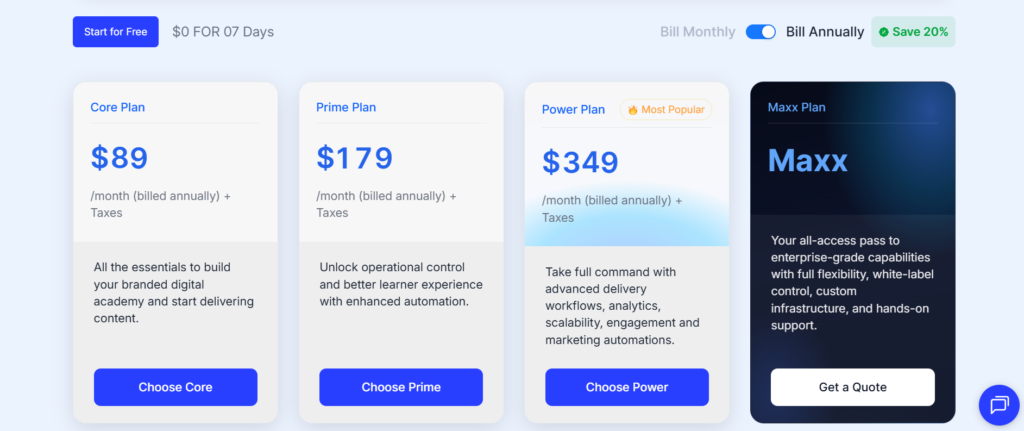
If your training business crossed $50 thousand in annual revenue and the ops team is still using spreadsheets, the manual overhead represents at least one coordinator-equivalent of wasted capacity per year. A Training OS starting at $89/month replaces that overhead at a fraction of the headcount cost.
Check out the Edmingle pricing page to see which plan suits your training business.
How to Choose the Right Training Management System in 2026
Platform evaluation in this category tends to get lost in feature checklists. These questions map more directly to what your commercial training business actually needs from a TMS. Ask them before deciding on a vendor.
- Does it support true multi-batch architecture, or just cohort tagging? Look for native scheduling across concurrent batches with separate instructors and rosters, not a course with labels applied to it.
- Are payments and compliance routed through a third party? Fee collection, country-compliant invoicing, and reconciliation inside the platform save your finance team a second system to manage.
- Does it cover all four layers, or only one or two? Operations and delivery without growth and intelligence still leaves you running separate tools for marketing and reporting.
- What is the actual cost at your scale, including transaction fees? Run the full annual cost, subscription plus payment gateway fees, against your real revenue, not the listed sticker price alone.
| Ready to run your training business on a real operating system? See how Edmingle handles your actual batch volume, payments, and reporting as a complete Training OS platform. Start a free trial Book a 30-minute demo |


